Lagos Life Download: No App Needed (iPhone, Android, PC)
Lagos Life needs no download. It runs in your browser at lagoslife.app. What iPhone, Android and PC need, home-screen shortcuts and APK warnings.
Updated and facts checked
On this page(9 sections)
You do not need to download Lagos Life. The official game runs in the browser at lagoslife.app, and the official site and its terms link to no App Store app, no Google Play app and no APK file (checked 9 to 11 October 2026). This page is an independent guide: it lists what each device needs, how to add a shortcut to your home screen, and what to do when a page offers you an app instead.
Short answer: open it in your browser
The official terms name two service addresses, lagoslife.app and lagoslife.eliysites.com. Both are websites. Open one in your browser, sign up or log in there, and play. Your game is saved on the official servers, as the site’s own loading message says.
If a result in an app store or a download site uses the name, it is not the game at these two addresses. Our official links page lists what those sites and apps say about themselves.
iPhone and iPad
- Requirement: the official site’s own loading message says the game needs iOS 16.4 or newer. Check Settings → General → Software Update.
- Browser: Safari is fine. Changing to another browser on iPhone will not help with an old iOS, because every iPhone browser uses the same engine.
Android
- Requirement: if the game says your browser is too old, update Chrome from the Play Store. The official loading message then points you to lagoslife.eliysites.com, the second address in the terms.
- Opened from TikTok, Instagram, X or Facebook? The official site checks whether it is running inside an app’s built-in browser. If it misbehaves there, open the link in Chrome instead. This tip is ours, not an official instruction.
PC and Mac
Open lagoslife.app in a desktop browser and log in with your account. There is no desktop download, and the official site gives no minimum browser version for computers; if a page will not load, try a current version of your browser.
If a page offers you an APK or an app
The official site and terms offer no install file and link to no app store. A page that offers a “Lagos Life APK” does not say who made the file, and an app-store listing with the name is published under a different developer name from the operator in the official terms. Neither is the game at lagoslife.app, and neither set of terms describes shared accounts or shared game money.
Our official links page lists each of them with what it says about itself and the date we checked. Use the official address for your official account, and type your password only after the address bar shows lagoslife.app or lagoslife.eliysites.com.
Is the Lagos Life app on Google Play official?
The official terms name no app. They list two service addresses, lagoslife.app and lagoslife.eliysites.com, and link to no app-store app. We checked on 11 October 2026, without installing the app.
- The listing: the Google Play page titled “Naija Life: Lagos Simulator” lists GreatCallie as its developer. Its description says “Naija Life is developed and published by GreatCallie International Ltd. It is not affiliated with any other app, game or website.” The description does not mention lagoslife.app. Its support email is at lagoslife.com.ng.
- The official terms: the terms of use, effective 1 October 2026, name two service addresses, lagoslife.app and lagoslife.eliysites.com, and “any other official Lagos Life service”. Section 32 names the operator as Vatar, Nigeria. The terms do not mention GreatCallie, Google Play or any app store.
- Another site: the terms on lagoslife.com.ng, last updated 5 October 2026, say “Naija Life is published by GreatCallie International Ltd (Nigeria)”. The official terms do not name that site. We have not checked whether GreatCallie and the operator are related, and public pages do not show whether this app is a service the operator runs.
So this page does not call the app official or unofficial. To play the game, use the address the official terms name. Before you install any app that uses the name, compare its developer and description with the terms.
If it will not load
The fixes built into the official site, including the Start fresh button and what to do before clearing browser data, are on our won’t-load section. Still stuck? The support address listed in the terms is support@lagoslife.app; we cannot see or fix accounts.
Add Lagos Life to your home screen
Do this last: once the icon is on your phone, you can open the game straight from it next time. The shortcut opens the same website, lagoslife.app, so you log in with the same account.
- iPhone or iPad (Safari): open lagoslife.app, tap Share, then Add to Home Screen.
- Android (Chrome): open lagoslife.app, tap the ⋮ menu, then Add to Home screen (Chrome may show Install app instead).
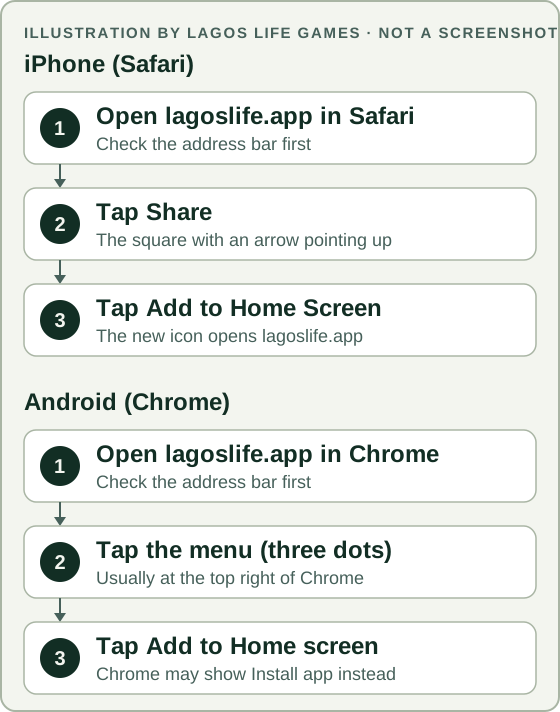
These are Apple’s and Google’s own steps for any website; both help pages are in the sources below. When we tested a shortcut on an iPhone on 11 October 2026, it opened the game normally. We have not tried it on Android. If an icon on your phone opens something other than lagoslife.app or lagoslife.eliysites.com, delete it and add it again from the official address.
Sources
Each source is listed with the day we last checked it. A check date records one look on that day; the game and its terms change often, so what you see in the game is what counts.
Official
The game’s own site, Terms of Use, public data and code. These support what the rules say and what the operator has published.
- Lagos Life official site: its loading messages (iOS 16.4 or newer, update Chrome on Android, “Start fresh”, in-app browser check) and the absence of app-store or APK links on its home, privacy and disclaimer pages. Checked
- Lagos Life Terms of Use: service addresses and “any other official Lagos Life service” (opening paragraph); the operator line “Vatar Nigeria” (§32); no mention of GreatCallie, Google Play or any app-store app. Checked
- Apple Support: Bookmark a website in Safari on iPhone: the Add to Home Screen steps in Safari. Checked
- Google Chrome Help: Use web apps (Android): the Add to Home screen / Install steps in Chrome for Android. Checked
Dated examples
A player’s post, video or screenshot with a date. These show what one player saw that day, not a rule.
- Google Play listing “Naija Life: Lagos Simulator”: a third-party store listing, not one of the official addresses: developer name GreatCallie; its description, which says the app is “developed and published by GreatCallie International Ltd” and “not affiliated with any other app, game or website”; a support email at lagoslife.com.ng; and no mention of lagoslife.app in the description. Checked
- lagoslife.com.ng Terms of use: its own statement that “Naija Life is published by GreatCallie International Ltd (Nigeria)” (last updated 5 October 2026). The official terms do not name this site. Checked
- Our own test on an iPhone: a Safari home-screen shortcut to lagoslife.app opened the game normally. Checked